
Home » Register
OKWW Register Guide: Create Your Account Fast on Mobile
Create your OKWW account today with a fast, mobile-first registration flow
OKWW register is quick on mobile and built for simple onboarding. Enter your mobile number, set a secure password, and confirm an OTP to activate your profile. Keep your profile name identical to your payment account name to avoid payout delays. If you ever need help, live chat and email support are easy to reach and responsive.
You can complete sign up in minutes from the app or browser. Start from the OKWW Official Website, tap Register, verify your number, and you’re ready to explore OKWW cricket markets and popular JILI games. Your details are saved for faster logins and smoother play on future visits.

Why opening an OKWW new account makes everyday play faster and safer
A registered profile gives you faster access, stronger security, and tools that match how you play on mobile.
Faster access on mobile with quick pages and light data usage
Registration lets you save login preferences, reduce repeated form fills, and get back to matches quickly, even on slower connections.
Personalized cricket markets and alerts tailored to your interests
Follow the cricket you care about first. Save leagues and matches, and see markets that match your style right when you open the lobby.
Verified profile matching for smoother deposits and withdrawals
Using your real name and verified number helps payments move without extra checks. Matched details reduce friction when you cash out.
Helpful support that understands local mobile habits and play
Registered members get priority assistance through chat and email. Get practical answers on verification, limits, and account updates.
Early visibility on OKWW bonus offers relevant to your play
See promotions suited to your activity, from match-focused deals to game-specific offers. You choose what works for your budget.
What the register button does and what you should prepare beforehand
Pressing the register button opens a secure sign-up form and starts OTP verification. After you confirm the code, your profile is created, and you can proceed to OKWW login. The system may ask for basic details like your full legal name and date of birth to keep payments accurate.
Have these ready before you start: your mobile number with SMS access, a working email, a strong password, and your preferred currency set to BDT. If you have a referral code, keep it handy. Using your exact account name from your wallet or bank today prevents identity checks from slowing withdrawals later.
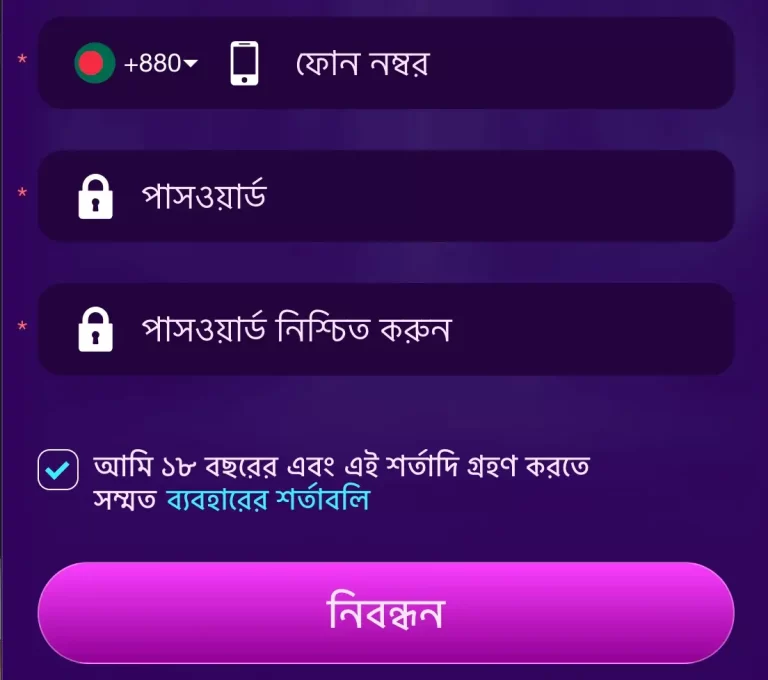
Step-by-step guide to OKWW sign up on mobile within a few minutes
- Open the OKWW official site in your mobile browser or launch the app from your home screen.
- Tap Register or Sign Up on the header. A short form appears with fields for mobile, email, and password.
- Enter your active local mobile number and a working email address. Choose BDT as your account currency.
- Create a strong password with letters, numbers, and a symbol. Read and accept the terms before proceeding.
- Enter the OTP sent to your phone. If it expires, request a new code and try again.
- Fill in your full name and date of birth as shown on your ID and payment account.
- Finish and you’ll be ready for OKWW login. Set a quick-access PIN in settings for faster future use.
If the form closes unexpectedly, reopen it from the OKWW Register button and continue where you left off.
Common OKWW account registration questions answered for new mobile-first members
Is creating an OKWW account free, and how long does it take?
Yes, registration is free. Most users finish in a couple of minutes, especially with mobile number and OTP ready.
What if I do not receive the OTP during sign up?
Wait a moment, then request a new code. Check SMS settings and coverage. Confirm the number you entered is correct. Contact support if issues persist.
Do I need to verify my identity before I can withdraw?
Yes, basic verification is required. Keep a photo ID ready and ensure your profile name matches your payment name to avoid delays.
Can I change my mobile number or email after registering?
Yes. Update details in your profile. For security, support may ask for verification before changes take effect.
How do I set my account currency and deposit limits at the start?
Select BDT during sign up. Then open wallet settings to set daily or weekly deposit limits that match your budget.
Ready to create your OKWW account and start with confident, secure play
Sign up now and move from browsing to playing in minutes. Verify your number, match your profile details, and enjoy quicker access to your favorite cricket markets and JILI games.
If you prefer a simple checklist, keep your mobile, email, and ID details nearby, then create OKWW account with a strong password. You’ll be set for fast logins, timely support, and payment flows that work the way you expect.